 AI Tiny Desk
2026 CREATOR GUIDE
Where Can I Make an Outstanding Tiny Desk AI Video? (2026 Guide)
Find out where to make an Outstanding Tiny Desk AI video from one photo. See the creator, watch an example, compare quality and credits, and follow the steps.
About this edition — First edition: creator screenshots, video example, supported settings, credit costs and sharing limitations.
The Short Answer
You can make an Outstanding Tiny Desk–style AI video with the AI Tiny Desk Video Generator on this site. Upload one clear adult portrait, choose quality and aspect ratio, then confirm a paid generation. The tool uses a prepared prompt and reference video to create a 15-second performance; you do not need to record yourself singing or upload a reference clip.
Available quality options are 480P / 720P / 1080P. A 720P video costs 480 credits. Free preview is currently unavailable; a verified account and enough credits are required. Likeness, lip sync and the original “Outstanding” recording are not guaranteed.
What’s new
- First edition: creator screenshots, video example, supported settings, credit costs and sharing limitations.
Where can you make it online?
Use the generator on this site if you want a prepared desk-concert scene with your portrait as the lead singer. You choose the photo, quality and framing; you do not build a scene or write a prompt from scratch.
Open the AI Tiny Desk Video Generator.
| Feature | Current product |
|---|---|
| Photo input | One consenting adult’s portrait |
| Video duration | 15 seconds |
| Resolution | 480P / 720P / 1080P |
| Prompt / reference upload | Prepared by the tool; no manual input required |
| Free preview | Currently unavailable |
| Friends / band casting | Not available; the reserved controls are disabled |
See the creator and a video example
These are project demonstration assets, not a generation made from your photo or a promise of identical results. Inspect the entire example with sound before deciding whether the style fits your idea.
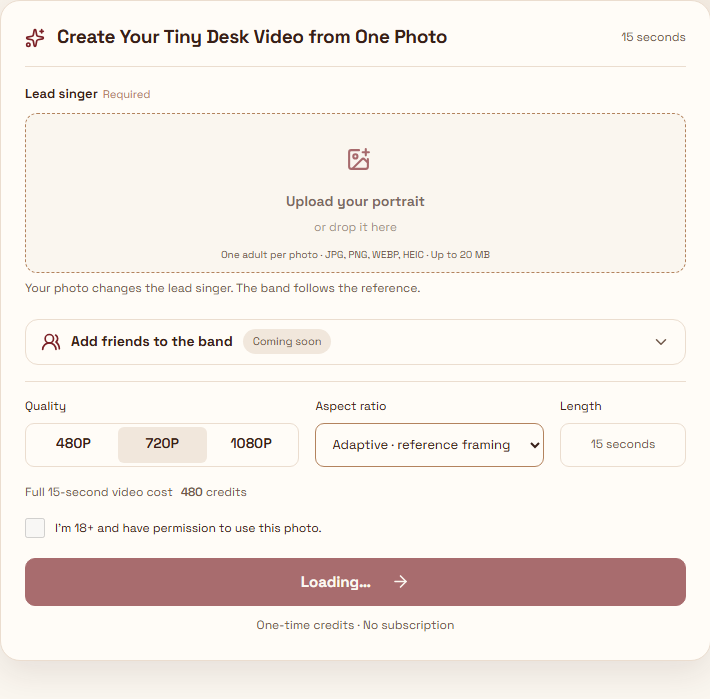
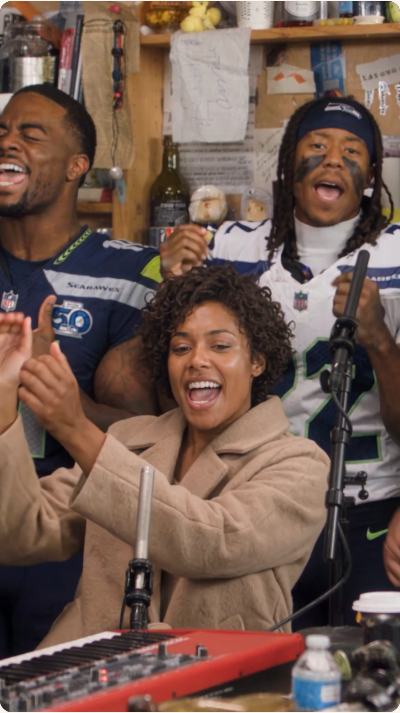
How to make it from one photo
1. Open the creator and upload a clear portrait
Use your own photo or an adult’s photo with consent to AI processing and the necessary rights. A visible face, even lighting and a simple composition give the model a clearer input. No reference upload is needed.
2. Choose settings and confirm generation
Select quality and aspect ratio, sign in and verify your account, then review the credit charge. If you need credits, buy a pack and return to the creator. Payment alone does not start generation: review the final confirmation. The configured output is 15 seconds.
3. Review, download and share
Follow the existing task in your creations area. Once it succeeds, play the full result and check face continuity, hands, microphone, motion and sound before downloading. If a task is still processing, inspect its status before submitting again.
Why choose a dedicated generator?
A dedicated generator suits someone who wants this prepared concert concept without prompt writing, reference selection or manual editing. A general-purpose editor is a better fit if you need your own scene, detailed shot control or a different duration. This tool does not offer individual casting for the band, guaranteed lip sync or a licensed copy of the song.
What photo works best?
Choose a sharp front-facing or slightly angled adult portrait. Avoid overlapping faces, sunglasses, covered mouths, heavy filters and strong shadows. A clearer source makes it easier to evaluate likeness, but AI can still change facial details, expressions and movement. Do not upload minors or public figures.
What is the Outstanding Tiny Desk AI trend?
The visual idea is a fictional performance in a crowded, informal desk-concert setting. The musical reference is Charlie Wilson’s 2023 NPR Tiny Desk Concert, whose set includes “Outstanding.” The original concert and AI recreations are different works; this independent tool is not affiliated with or endorsed by NPR or NPR Music.
Check costs and sharing conditions
Generation is paid. Credit usage depends on the selected quality, as shown below. Credits are sold in one-time packs; check the current pricing page before purchase. A video file does not establish music rights: the original recording is not guaranteed, and sharing requires the relevant image and audio rights and compliance with the destination platform’s rules.
| Quality | Credits |
|---|---|
| 480P | 240 |
| 720P | 480 |
| 1080P | 960 |
Frequently asked questions
Can I make it from just one picture?
Yes. The current flow takes one lead-singer portrait. The friends and band-member controls are not available.
Do I need to write a prompt or record myself singing?
No. The tool supplies a prompt and reference clip. You provide a portrait and choose the available settings.
Is every result 720p?
No. Choose from 480P / 720P / 1080P. The configured duration is 15 seconds, and the credit charge varies by quality.
Is it free to try?
Free preview is currently unavailable. A 720P generation costs 480 credits and requires a verified account.
Will I get the original Outstanding song?
The original recording is not guaranteed. Listen to your output and check music rights separately before publishing.
Can I post it on TikTok or Instagram?
Check the platform’s current content and AI disclosure rules and make sure you have the required image and music rights. Generation does not automatically grant those rights.
Is this an official NPR product?
No. AI Tiny Desk is an independent tool and is not affiliated with or endorsed by NPR or NPR Music.